Worldwide Shipping 24/7 Expert Support

JLR SDD: The Complete Guide to Jaguar Land Rover Diagnostics

Everything you need to know about JLR SDD programming, from software download and installation to system requirements, offline programming, BCM coding, and J2534 interfaces.

2005-2016 Vehicle Coverage
Dealer Level Access
24/7 Remote Support
Genuine OEM Software

What Is JLR SDD?

The official diagnostic platform for Jaguar Land Rover vehicles built from 2005 to 2016.

JLR SDD (Symptom Driven Diagnostics) is the official Jaguar Land Rover diagnostic and programming platform designed for vehicles manufactured between 2005 and 2016. It is the successor to the older Jaguar IDS system, which was used exclusively for Jaguar vehicles before the Jaguar and Land Rover brands merged under the Tata Motors umbrella. Today, SDD remains an essential tool for independent workshops, mobile technicians, and enthusiast owners who need dealer-level access to older JLR vehicles.

The software provides a comprehensive suite of diagnostic capabilities including reading and clearing Diagnostic Trouble Codes (DTCs), streaming live data from all major modules, performing guided fault-finding procedures, programming replacement modules, and calibrating sensors and actuators. SDD is particularly valued for its structured, symptom-based approach that guides technicians through complex diagnostic routines step by step.

At SX-CAN, we supply licensed JLR SDD software with full calibration files and NGI updates, ensuring your workshop has everything needed to service these vehicles correctly. Our JLR SDD package includes remote installation support and 12-month technical assistance.

Key Facts

  • Full Name: Symptom Driven Diagnostics
  • Predecessor: Jaguar IDS (Integrated Diagnostic System)
  • Successor: JLR Pathfinder (2017+)
  • Coverage: 2005-2016 Jaguar & Land Rover
  • Protocol: CAN bus / J2534
  • Interface: Mongoose JLR Cable / JLR VCI

JLR SDD vs Jaguar IDS

Understanding the evolution of Jaguar Land Rover diagnostic platforms.

Jaguar IDS was the original diagnostic system developed for Jaguar vehicles before the formation of Jaguar Land Rover. After the merger, SDD was introduced to unify diagnostics across both brands. Today, JLR Pathfinder serves the latest generation of vehicles. The table below shows how each platform compares.

Feature Jaguar IDS JLR SDD JLR Pathfinder
Vehicle Years Pre-2005 Jaguar 2005-2016 Jaguar & Land Rover 2017+ Jaguar & Land Rover
Brands Covered Jaguar only Jaguar & Land Rover Jaguar & Land Rover
Interface Protocol CAN / K-Line CAN / J2534 DoIP / J2534
Guided Diagnostics Basic Advanced symptom-driven Module-oriented
Offline Programming Limited Yes Limited
Online Programming No Via TOPIX (limited) Via TOPIX Cloud
BCM Programming Basic Full support Full support
Current Availability Discontinued Available Available

Read Full SDD vs Pathfinder Guide

JLR SDD System Requirements

Ensure your laptop or PC meets these specifications before installation.

Meeting the correct JLR SDD system requirements is essential for reliable installation and smooth operation. Below are the minimum and recommended specifications for running SDD in a workshop environment.

Component Minimum Recommended
Operating System Windows 7 SP1 (64-bit) Windows 10 Pro (64-bit)
Processor Intel Core i3 or equivalent Intel Core i5 or i7
RAM 4 GB 8 GB or more
Disk Space 40 GB free 80 GB free SSD
USB Ports 1x USB 2.0 2x USB 3.0
Internet Broadband (2 Mbps) Broadband (10 Mbps+)
Display 1366 x 768 1920 x 1080
Java Runtime Java 8 Update 101+ Java 8 (latest)

Tip: An SSD dramatically improves SDD loading times and responsiveness during calibration searches. We strongly recommend avoiding traditional hard disk drives for workshop diagnostic laptops. For a ready-to-use solution, consider our Panasonic Toughbook CF-54 pre-configured with JLR SDD.

Read Full System Requirements Guide

JLR SDD Installation Guide

Step-by-step instructions for downloading, installing, and activating JLR SDD.

Proper JLR SDD installation ensures the software runs reliably and can communicate with your vehicle. Follow these steps carefully, or let our team handle the setup remotely.

1

Download the Software

Obtain the JLR SDD programming software download from an authorised source. The package includes the base application, Java runtime, and calibration databases. Ensure you have a stable internet connection, as the full download is approximately 12-18 GB.

2

Install the Base Application

Run the installer as administrator. Install the SDD client, the JLR Integrated Diagnostic System (IDS) framework, and any prerequisite components such as the correct Java version and Visual C++ redistributables. Restart your PC when prompted.

3

Install VCI Drivers

Install the drivers for your J2534 interface. If you are using the Mongoose JLR cable, install the Drew Technologies driver package. For the JLR VCI, install the official JLR device driver. Ensure the interface is recognised in Windows Device Manager before proceeding.

4

Activate Your Licence

Enter your licence key to activate the software. This step typically requires an internet connection to validate the licence against the activation server. Save your licence details in a secure location for future reference.

5

Configure Vehicle Communication

Launch SDD and navigate to the device configuration settings. Select your J2534 interface from the list, test the connection, and verify that the software can detect the VCI. Set the correct COM port if required.

6

Update Calibration Files

Download and install the latest NGI calibration files and module databases. These files are essential for programming and calibration tasks. At SX-CAN, we provide the latest calibration package with every SDD licence purchase.

Book Remote Installation

JLR SDD Offline Programming

Programme modules, clear codes, and calibrate sensors without an internet connection.

JLR SDD offline programming is one of the most powerful features of the platform, allowing workshops and technicians to perform module programming, calibration updates, and configuration changes without a live connection to Jaguar Land Rover servers. This is particularly valuable for mobile technicians working in areas with limited connectivity or for workshops that prefer to minimise online dependency.

Offline programming with SDD covers a wide range of routine tasks. You can read and clear diagnostic trouble codes from all connected modules, stream live data for real-time analysis, programme replacement modules with the correct configuration data, and perform sensor calibrations such as steering angle reset, throttle adaptation, and injector coding. These functions are sufficient for the majority of day-to-day diagnostic and repair work on older JLR vehicles.

However, there are important limitations to understand. Certain security-sensitive operations, such as immobiliser-related programming, key pairing, and some BCM virginising procedures, may require an online connection or dealer-level authorisation. Additionally, the latest calibration files and software updates for modules are only available through online channels or TOPIX Cloud. For workshops that need full online capability, we recommend pairing SDD with a TOPIX Cloud subscription.

Offline Capable

  • DTC reading & clearing
  • Live data streaming
  • Module programming
  • Sensor calibration
  • Guided fault finding
  • Service reset procedures

Online Required

  • Latest calibration updates
  • Some security programming
  • Key pairing & KVM work
  • Certain BCM virginising

Read Full Offline Programming Guide

JLR SDD J2534 Interface

Choose the right VCI cable for reliable communication with your vehicle.

A J2534-compatible interface is the physical bridge between your laptop and the vehicle's diagnostic network. Choosing the correct interface for JLR SDD ensures stable communication, faster programming, and fewer connection errors.

Most Popular Jaguar Landrover VCI interface for SDD
VCI Interface

Jaguar Landrover VCI interface for SDD

The OEM J2534 pass-thru interface for JLR SDD. Genuine device driver support, reliable communication, and full diagnostic access for 2005–2016 vehicles.

$599
View Product
DoIP Ready DA-DoIP VCI D-PDU J2534 PassThru
DoIP VCI

DA-DoIP VCI D-PDU J2534 PassThru

Dual-protocol VCI supporting both J2534 CAN and DoIP Ethernet. Future-proof your workshop for mixed vehicle fleets with one interface.

$899
View Product
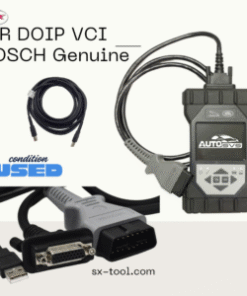
Wireless The JLR DOIP VCI WF Bosch Genuine
DoIP VCI

The JLR DOIP VCI WF Bosch Genuine

Wireless DoIP VCI with WiFi connectivity. Eliminates cable clutter and allows flexible positioning in the workshop during long programming sessions.

$1,999
View Product

Note: While JLR SDD works with basic J2534 cables, we recommend the DA-DoIP VCI if you plan to add JLR Pathfinder for newer vehicles in the future. This avoids buying a second interface later.

JLR SDD BCM Programming

Body Control Module coding, virginising, and configuration with SDD.

The Body Control Module (BCM) is one of the most important modules in any modern vehicle, responsible for managing central locking, interior and exterior lighting, power windows, wiper control, and various comfort features. JLR SDD BCM programming gives you the ability to read, write, and reconfigure the BCM on compatible Jaguar Land Rover vehicles.

BCM programming with SDD covers several key tasks. When a replacement BCM is installed, it must be "virginised" and then programmed with the correct vehicle-specific data. This process ensures the new module recognises the vehicle's unique configuration and communicates correctly with other modules on the CAN network. SDD can also be used to modify BCM configuration settings, such as enabling or disabling auto-lock, changing indicator flash behaviour, and adjusting lighting timeout values.

BCM virginising is a sensitive procedure that requires care. The process typically involves reading the existing BCM data, erasing the module to a blank state, writing the new configuration, and performing a network reset. Incorrect data or interrupted communication can result in a non-functioning module. For this reason, we strongly recommend that workshops without BCM experience use our remote programming service, where our JLR-trained engineers handle the procedure safely.

Common BCM Codes

  • B1B00 - Central locking fault
  • B1B01 - Door latch malfunction
  • B1B02 - Lighting circuit error
  • B1B03 - Wiper motor control fault
  • B1B04 - Window lift module error
  • B1B05 - Seat memory module fault
  • U0010 - CAN bus communication error

Note: DTC codes vary by model and year. Always refer to the latest SDD diagnostic data for your specific vehicle.

Read Full BCM Programming Guide

JLR SDD Diagnostic Tool Features

Dealer-level capability for every diagnostic and programming task.

DTC Reading & Clearing

Read and clear diagnostic trouble codes from every module on the vehicle. SDD provides full code descriptions, freeze-frame data, and guided repair suggestions.

Live Data Streaming

Monitor real-time sensor values, actuator positions, and module states across all major systems. Graph data over time to identify intermittent faults.

Module Programming

Programme replacement ECUs, TCUs, and body modules with the correct vehicle configuration. Includes flash programming and EEPROM writes where supported.

Compatible Vehicles

JLR SDD covers the full Jaguar Land Rover range from 2005 to 2016.

Model Code Year Range SDD Support
Land Rover Defender L316 2007-2016 Full
Land Rover Discovery 3 L319 2004-2009 Full
Land Rover Discovery 4 L319 2009-2016 Full
Range Rover (L322) L322 2005-2012 Full
Range Rover Sport (L320) L320 2005-2013 Full
Range Rover Sport (L494) L494 2014-2016 Full
Range Rover Evoque L538 2011-2016 Full
Range Rover (L405) L405 2012-2016 Full
Jaguar XF X250 2008-2015 Full
Jaguar XJ X351 2010-2016 Full
Jaguar XK X150 2006-2014 Full
Jaguar F-TYPE X152 2013-2016 Full
Jaguar F-PACE X761 2016 Limited

Not sure if your vehicle is covered? Contact our team with your VIN and we will confirm compatibility.

Frequently Asked Questions

Common questions about JLR SDD programming, installation, and usage.

What is JLR SDD and what does it do?

JLR SDD (Symptom Driven Diagnostics) is the official Jaguar Land Rover diagnostic platform for vehicles built between 2005 and 2016. It enables reading and clearing diagnostic trouble codes, viewing live data streams, programming and calibrating modules, configuring vehicle features, and performing guided fault-finding procedures. SDD is essential for any workshop or enthusiast working on older JLR vehicles.

Can I download JLR SDD programming software for free?

No, genuine JLR SDD programming software is not available as a free download. It requires an official licence from Jaguar Land Rover or an authorised supplier. At SX-CAN, we provide licensed JLR SDD software with genuine calibration files, remote installation support, and ongoing technical assistance. Unlicensed or cracked versions can damage vehicle modules and void warranties.

What are the JLR SDD system requirements?

JLR SDD requires a Windows 7 or Windows 10 PC with at least 4 GB RAM (8 GB recommended), 40 GB of free disk space, a USB 2.0 or 3.0 port for the VCI interface, and a stable internet connection for online features. An SSD is strongly recommended for faster installation and operation. SDD can run on a Panasonic Toughbook CF-54 or similar rugged laptops ideal for workshop environments.

What is JLR SDD offline programming?

JLR SDD offline programming allows you to programme and calibrate vehicle modules without an active internet connection to Jaguar Land Rover servers. This is useful for routine module coding, configuration changes, and some calibration updates. However, not all functions are available offline; certain security-related programming and latest calibration files may require an online connection or TOPIX Cloud subscription.

Which J2534 interface works with JLR SDD?

JLR SDD works with J2534-compatible interfaces including the Mongoose JLR cable, the original JLR VCI, and several third-party J2534 pass-thru devices. The Mongoose JLR cable is the most popular choice for SDD due to its reliability and broad compatibility. For newer vehicles requiring DoIP, the DA-DoIP VCI or JLR DoIP VCI with WiFi is required instead.

Can I use JLR SDD for BCM programming?

Yes, JLR SDD supports BCM (Body Control Module) programming on compatible vehicles. This includes reading and writing BCM configuration data, virginising replacement BCM modules, and coding body control functions such as central locking, lighting, and window behaviour. BCM programming with SDD requires care and attention to ensure the correct vehicle data is written to the module.

How do I install JLR SDD software?

Installing JLR SDD involves downloading the software from an authorised source, installing the base application and Java runtime, configuring the VCI drivers, activating the licence, and updating the calibration files. The process typically takes one to two hours. SX-CAN offers remote installation support via TeamViewer or AnyDesk, where our engineers complete the entire setup for you.

What is the difference between Jaguar IDS and JLR SDD?

Jaguar IDS (Integrated Diagnostic System) was the original diagnostic platform used exclusively for Jaguar vehicles before the merger with Land Rover. After the formation of Jaguar Land Rover, SDD (Symptom Driven Diagnostics) was introduced as the unified platform for both Jaguar and Land Rover vehicles. SDD replaced IDS with a more modern interface, broader vehicle coverage, and improved guided diagnostics.

Get in Touch

Have a question about JLR diagnostics, software, or activation services? Fill out the form below and our team will respond within 24 hours.

Call Telegram WhatsApp