
JLR CCF Tools 4.8 JLR CCF Editor for Pathfinder SDD
$99.00
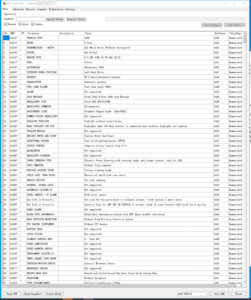
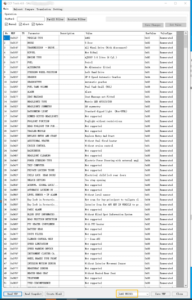
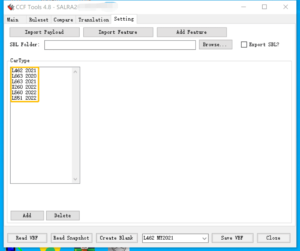
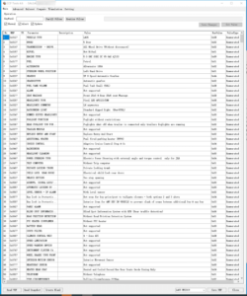
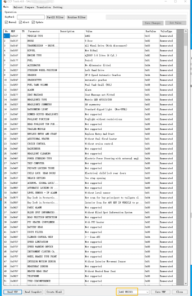
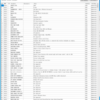
JLR CCF Tools v4.8 Features, read VBF, search by keyword, read header, compare VBF files, Translation, Efg Common Code, Support MY 2021 – 2022 Car models. Support MY 2021 – 2022 L462 L663 X260 L560 L551
Unlock Full JLR Configuration Control
Unlock the full potential of your Jaguar Land Rover diagnostic system with JLR CCF Tools 4.8. This powerful software suite puts a comprehensive CCF (Car Configuration File) Editor at your fingertips, perfectly designed to integrate with JLR’s Pathfinder SDD. Whether you run an independent workshop, manage a fleet, or drive a personal JLR vehicle, this tool delivers professional-grade configuration control that you can trust.
The JLR CCF Editor allows you to read, edit, and write configuration files that control critical vehicle functions. You can modify VIN numbers, alter immobilizer settings, enable hidden factory features, and calibrate ECUs after module replacement. Every change occurs directly within the SDD environment, maintaining full compatibility with JLR’s security protocols. The editor handles As-Built data with precision, ensuring that your modifications remain stable and error-free.
Key Features of JLR CCF Tools 4.8
- Complete CCF Editing Suite: Open, view, and amend every parameter inside JLR Car Configuration Files. The editor supports all standard CCF versions and file structures.
- Seamless SDD Integration: Launch the editor directly from Pathfinder SDD’s interface. The tool works as a natural extension of your existing diagnostic workflow, eliminating the need for extra software.
- Automated Backup and Recovery: Before any modification, the software automatically creates a full backup. This safeguard guarantees that you can restore the original configuration at any time.
- VIN and Immobilizer Programming: Update vehicle identification numbers and immobilizer data confidently. The tool guides you through each step, reducing the risk of mismatches.
- Multi-Model Compatibility: Use the tool on all modern JLR platforms, including Denso, Bosch, and Continental ECUs. The editor covers the Defender, Discovery, Range Rover, E-Pace, F-Pace, XE, XF, and F-Type.
- User-Friendly Graphical Interface: Navigate complex configuration maps with a clean, logical layout. Colour-coded parameters and clear labels make even advanced coding tasks straightforward.
- Regular Updates and Support: You receive access to ongoing software updates that keep pace with JLR’s latest model releases and SDD version changes.
Typical Applications for JLR Specialists
Our JLR CCF Editor solves real-world challenges that workshops face every day. Consider these common scenarios:
- Module Replacement and Cloning: After installing a second-hand ECU or control unit, the vehicle often rejects the part because the stored VIN and configuration do not match. With JLR CCF Tools 4.8, you can read the new module, correct the VIN, and upload the proper As-Built data. The process takes just minutes and restores full functionality.
- Retrofit and Feature Enabling: Many JLR vehicles leave the factory with dormant hardware. You can activate features such as adaptive cruise control, lane departure warning, Meridian surround sound, or digital television using the CCF editor. Simply tick the correct configuration boxes and write the updated file to the vehicle.
- Immobilizer and Key Programming: When you replace the instrument cluster, keyless entry module, or engine ECU, you must update the immobilizer data. The tool provides direct fields for editing synchronization codes and key hash numbers, making security programming straightforward.
- Fleet and Pre-Delivery Standardization: For dealerships and large operators, the editor enables you to enforce consistent vehicle settings across an entire batch—mirror folding behaviour, daytime running light rules, or instrument cluster splash screens.
Technical Requirements
JLR CCF Tools 4.8 runs on any Windows PC that already hosts a working Pathfinder SDD installation. Minimum system requirements include:
- Operating System: Windows 7, 8, 10, or 11 (64-bit recommended)
- SDD Version: Compatible with Pathfinder SDD v150 and later
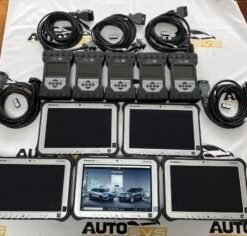
- Hardware: MongoosePro JLR, VXDIAG VCX JLR, or any SDD-approved J2534 Pass-Thru interface
- Disk Space: 200 MB of free space for the editor and backup files
- Memory: 4 GB RAM or higher
Why Choose JLR CCF Tools 4.8?
Workshops around the world rely on our JLR CCF Editor because it combines speed, safety, and simplicity. You can complete configuration tasks in minutes that previously required expensive dealer visits. The intuitive design flattens the learning curve, so even technicians new to JLR coding achieve professional results quickly. Plus, the integrated backup system protects you and your customers against costly mistakes.
Unlike generic diagnostic scanners that only offer limited coding, JLR CCF Tools 4.8 gives you deep, module-level access. You gain the same capabilities as factory engineering tools—without the prohibitive costs. Each copy of the software undergoes rigorous testing on real JLR vehicles to guarantee stability and reliability.
Get Started Now
Purchase your copy of JLR CCF Tools 4.8 directly from SX-CAN.com and receive instant download access. Each license includes free technical support to help you with installation and first-time usage. Join the community of JLR specialists who have already transformed their diagnostic capabilities.
Click the Add to Cart button and start editing JLR configuration files with confidence today.
Related products

JLR Diagnostics
JLR Diagnostics

JLR Diagnostics

JLR Diagnostics
Remote Software Install SDD Pathfinder Work with JLR-DOIP-VCI-WF
JLR Diagnostics
JLR Diagnostics
JLR Diagnostics