

2in1 JLR CCF Tools 4.6 and JLR CCF Tools 4.8 Registration

$149.00
JLR CCF Tools 4.6 and JLR CCF Tools 4.8 Registration
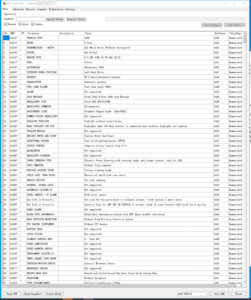
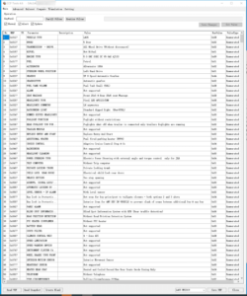
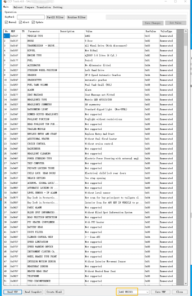
JLR CCF Tools 4.6 Features, read VBF, search by keyword, read the header, compare VBF files, Translation, Efg Common Code, Support MY 2015 – 2019.5 Car models. L538, L550, X260, X760, X540, L405, L494, L462
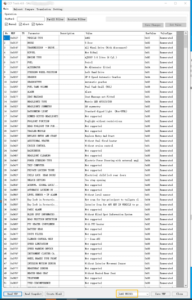
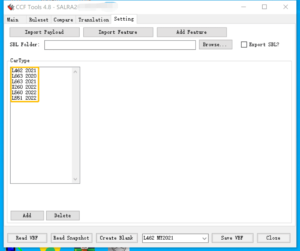
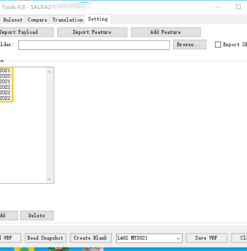
JLR CCF Tools 4.8 Features, read VBF, search by keyword, read the header, compare VBF files, Translation, Efg Common Code, Support MY 2021 – 2022 Car models. Support MY 2021 – 2022 L462 L663 X260 L560 L551
2in1 JLR CCF Tools 4.6 and 4.8 Registration
What Are JLR CCF Tools?
The JLR CCF Car Configuration File Tools give you direct, dealer-level access to the configuration data stored inside every Jaguar Land Rover vehicle. Each module in the car reads a master configuration file that determines how the vehicle behaves—which features activate, which options appear on the dashboard, and how the ECUs talk to each other. When you retrofit a new module, add a tow bar, or enable a hidden feature like daytime running lights, you must edit this CCF file. The factory diagnostic software performs this task, but the dedicated CCF Tools do it faster, with more detailed control, and without requiring a full diagnostic session licence.
Why You Need Both Version 4.6 and 4.8
JLR vehicles span two distinct electronic architectures. Older models, predominantly those served by SDD (Symptom Driven Diagnostics), use an earlier CCF format that the 4.6 tool handles perfectly. Newer vehicles, from around 2015 onwards, use an updated structure that requires the enhanced parsing engine found in version 4.8. By registering both tools together, you cover every JLR vehicle in your workshop—from a 2005 Discovery 3 to a 2023 Range Rover Sport. You never have to turn away a job because your tool cannot read the configuration format.
- CCF Tools 4.6: Full read, edit, and write capability for SDD‑era vehicles (2005–2017). It opens the standard XML‑based CCF files and displays every parameter in a structured, searchable list.
- CCF Tools 4.8: Complete support for the newer, compressed CCF format used by Pathfinder‑era vehicles (2017–2023). It includes additional decoding logic for the enhanced security module and driver assistance systems.
What You Can Achieve with Registered CCF Tools
Once you register both tools, you unlock all editing functions without restriction. You perform tasks that previously required expensive dealer equipment or third‑party coding services:
- Enable factory options that are physically present but software‑disabled: daytime running lights, cornering lights, puddle lamps, navigation voice guidance, or off‑road information screens.
- Retrofit modules correctly—when you add a tow bar ECU, a reverse camera, a digital instrument cluster, or upgraded audio, you add or modify the CCF entries so the vehicle recognises and integrates the new hardware.
- Fix configuration mismatches after second‑hand module replacements: if you install a used BCM, instrument pack, or audio unit, you update the CCF to reflect the actual installed options and remove conflicting donor data.
- Customise vehicle behaviour: alter the number of indicator flashes for the lane‑change function, change the tilt‑down angle of the passenger mirror in reverse, or adjust the sensitivity of the automatic headlamps.
- Correct corrupted CCF files: when a vehicle arrives with multiple CAN communication errors and misconfigured modules, you read the existing file, compare it with the factory specification, and restore the correct settings.
How the Registration Works
- Purchase the 2in1 bundle and receive your unique licence key by email within minutes.
- Download the CCF Tools 4.6 and 4.8 installation packages from our secure download portal.
- Install both tools on your laptop (Windows 7, 8, 10, or 11 supported).
- Enter your licence key when prompted—no online validation required after the initial activation.
- Connect your J2534 diagnostic interface (Mongoose Pro, VXDIAG, or dealer VCI) to the vehicle, read the current CCF, and start editing.
You hold a permanent licence; no recurring subscription fees apply.
Vehicle Compatibility
Together, the two tools cover the following vehicle ranges:
- CCF Tools 4.6: Discovery 3, Discovery 4, Range Rover L322 (2005–2012), Range Rover Sport L320, Jaguar X-Type, XF X250, XJ X350/X351, XK X150, and related models.
- CCF Tools 4.8: Range Rover L405, L460, Range Rover Sport L494, L461, Velar L560, Evoque L538, L551, Discovery 5 L462, Discovery Sport L550, Defender L663, Jaguar XE X760, XF X260, F‑Pace X761, E‑Pace X540, I‑Pace, and all current models.
If you work on a mix of older and newer JLR vehicles, this bundle equips you completely.
Why You Register Through SX‑CAN
We specialise strictly in JLR diagnostics and coding. Our team tests every registration key and software installer on multiple laptops and VCIs before we release them. When you buy from us, you receive the exact, known‑working version of the tools, not a generic download that may contain outdated or incompatible files. We also provide direct technical support—if you struggle to connect or need guidance on a specific CCF edit, our engineers help you over email or remote session. We respond quickly and understand JLR electronics deeply.
Frequently Asked Questions
Q: Do the tools write directly to the vehicle modules?
A: Yes. You read the configuration file, make your edits, and write it back to the vehicle through your J2534 interface. The process takes only a few minutes.
Q: Does the licence expire?
A: No. Your registration key gives you lifetime access to both tools. You install them on your primary PC and reinstall as needed without paying again.
Q: Can I use both tools with one J2534 interface?
A: Absolutely. Both versions communicate through the same Passthru driver, so your Mongoose Pro or VXDIAG works for every vehicle.
Q: What if I make a mistake editing the CCF?
A: We recommend saving a backup of the original file before writing changes. The tools prompt you to do this automatically. If you need to revert, you simply write the backup.
Purchase Your Registration Now
Add the 2in1 JLR CCF Tools 4.6 and 4.8 Registration to your basket. You receive your licence key and download links within minutes, and our support team stands ready to help you with any configuration task. Gain full control over every JLR vehicle’s settings—without paying per‑session fees or waiting for a third‑party coder.
Related products
JLR Diagnostics

JLR Diagnostics
JLR Diagnostics
JLR Diagnostics
JLR Diagnostics

JLR Diagnostics
JLR Diagnostics